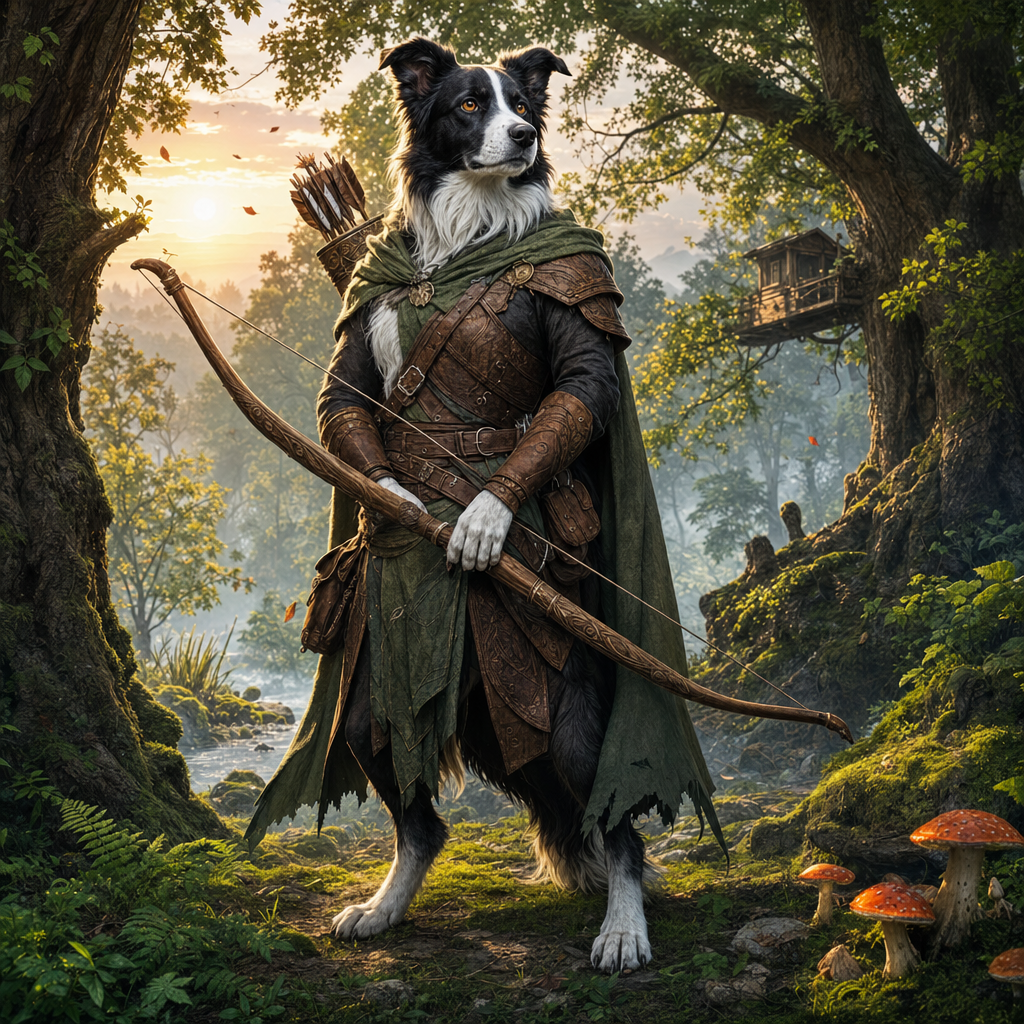
I've rolled a lot of characters over the years. Late nights at my kitchen table, solo campaigns that stretched into morning, notebooks full of backstories that never quite matched the generic character art I'd find online. The mechanics were always fine—stats, skills, class features—but something felt hollow. Then I discovered you could use a D&D character generator from image, and everything changed.
Here's what happened: I uploaded a photo of my border collie, Maggie. Not as a joke. Not as a gimmick. I genuinely wanted to see if a character generator could capture what made her her—the black and white patches, the intensity in her eyes when she's working, that mix of loyalty and independence. Three minutes later, I had a fifth-level ranger with Maggie's exact markings, a stats block that somehow fit her personality, and a backstory about protecting frontier settlements from goblin raids.
I've been playing her for six months now. Best character I've ever run.
How a D&D Character Generator From Image Actually Works
Most character generators ask you to pick from dropdown menus. Race: elf, dwarf, human. Class: fighter, wizard, rogue. Hair color: brown, blonde, black. You click through options hoping something clicks, but you're building Ikea furniture—functional, forgettable, and basically identical to everyone else's.
A D&D character generator from image flips that process. You start with something real—a photo of your pet, your friend, yourself, even a stranger's face that sparked a character idea—and the generator builds outward from there. The AI analyzes the image: coloring, features, expression, even the vibe. Then it creates a fantasy character that actually looks like your starting point.
For Maggie, that meant:
- A lupine ranger (anthropomorphic, standing upright, hands that could draw a bowstring) with her signature black and white coat pattern
- Amber eyes that matched her real ones
- A lean, athletic build—because she's a working dog, not a lap dog
- Personality traits pulled from her temperament: alert, protective, food-motivated
The character generator at Creature Forge AI handles the 5e stats automatically. You get ability scores, proficiencies, equipment, spells if you want them. But the magic is in the art and the feeling—this isn't some stock elf ranger. This is your ranger.
Why You'd Want to Generate a Character From a Photo
I'll be honest: the first time someone told me they'd turned their cat into a rogue, I thought it was cute but pointless. Then I tried it. Turns out there are legitimate reasons this approach makes your game better.
1. Instant Emotional Investment
When your character looks like someone (or something) you care about, you're invested from session zero. I didn't have to work to care about Maggie-the-ranger's survival. I already knew her. I knew how she'd react to a threat, how she'd protect her pack, when she'd go feral over a turkey leg. That depth doesn't come from a rolled backstory—it comes from lived experience.
2. Unique, Memorable Designs
Every table has that one player with the edgy tiefling rogue or the stoic dwarf cleric. Nothing wrong with that, but you're competing with a thousand identical Pinterest boards. Upload a photo of your pet or your kid or your weirdly photogenic uncle, and you've got a character nobody else at the table has ever seen. Original art, custom design, no stock images.
3. Perfect for New Players
Character creation overwhelms new players. Races, classes, feats, backgrounds, alignment—it's decision paralysis before the game even starts. A D&D character generator from image cuts through that. Upload a photo, pick a class if you want to customize (or let the generator suggest one), and you're done. You've got a complete, playable character and you didn't need to understand action economy or spell slots yet.
4. Solves the "I Can't Draw" Problem
I can draw a stick figure. Maybe. Paying a commission artist for custom character art costs $50-$200 and takes weeks. Most of us end up scrolling through generic fantasy art packs hoping something's close enough. With an image-based generator, you get custom art that's actually yours, built from a photo you provided, ready in minutes.
What You Can (and Should) Upload
The tool works with basically any clear photo, but some inputs are more fun than others. Here's what I've tried (and what worked):
- Pets: Dogs, cats, horses, birds, that one goat who thinks he's a dog. If it has a face and personality, it'll make a great character. My goat Biscuit has more charisma than any NPC I've ever rolled, and yes, I turned him into a bard.
- Yourself: Want to play as a fantasy version of you? Upload a selfie. You'll get a character that actually looks like you—same face shape, hair color, build—but with pointed ears or scales or whatever fantasy twist you're after.
- Friends and family: With permission, obviously. I made my sister into a paladin for her birthday. She'd never played D&D, but she loved seeing herself in plate armor with a glowing sword.
- Historical photos: That old picture of your grandfather in his Navy uniform? He'd make an excellent fighter or ranger. The generator captures era-appropriate toughness.
- Random inspiration: Sometimes you see a face in a crowd or a pet at a shelter and think, "That's a character." Snap a photo, upload it, see what happens.
The key is a clear, well-lit photo where you can actually see the subject's face and features. Blurry phone pics from across a field won't give the generator much to work with.
The Farm Test: Turning Real Animals Into Fantasy Heroes
Growing up on a farm meant I was surrounded by personalities. Not just pets—personalities. The rooster who attacked anyone in a red shirt. The barn cat who'd only hunt if you asked her politely. The horse who'd unlatch his own stall and wander into the feed room like he owned the place.
I started running a solo campaign where every NPC was based on a farm animal I'd known. The tavern keeper was that barn cat—aloof, competent, only helpful when it suited her. The blacksmith was the horse—strong, stubborn, smarter than he let on. The local troublemaker was absolutely the rooster.
Using a D&D character generator from image, I uploaded old photos of these animals and built them as anthropomorphic characters. The generator kept their coloring, their builds, even something about their expressions that felt right. That rooster became a belligerent fighter with a gambling problem and a personal vendetta against anyone wearing red. The horse became a craftsman with a dry sense of humor and a tendency to "accidentally" break tools when annoyed.
It shouldn't have worked as well as it did. But when you base characters on real creatures you've known—creatures with actual quirks and histories—they come alive at the table in ways random generators never manage.
How to Get the Most Out of Your Image-Generated Character
The generator does the heavy lifting, but you can guide the results:
- Pick a good photo: Clear lighting, visible features, ideally a straight-on or slight-angle shot. The better the AI can "read" the image, the more accurate your character.
- Think about class before you upload: You can let the generator suggest a class, but if you already know your border collie should be a ranger or your tabby cat should be a rogue, that direction helps.
- Customize after generation: The generator gives you a complete character, but you can tweak stats, swap equipment, adjust the backstory. Use the output as a starting point, not a straightjacket.
- Keep the original photo handy: When you're playing, it helps to glance at the real photo and remember the personality behind the stats. That's where the character depth lives.
Why Creature Forge AI Does This Better
I've tried other D&D character generators from image tools. Most either give you generic fantasy art that barely resembles your photo, or they create a character that looks right but has zero mechanical support—just a pretty picture with no stats, no skills, no usable game content.
Creature Forge AI does both. You upload your image and get:
- Custom character art that actually looks like your subject
- Full 5e stat blocks (ability scores, proficiencies, features, equipment)
- Suggested personality traits, ideals, bonds, and flaws
- A backstory hook you can expand or modify
- The option to generate as a PC (player character) or NPC depending on your needs
The character generator is fast—under five minutes from upload to finished character—and you can regenerate or tweak results until you're happy. No subscriptions, no complicated forms, just upload and build.
When to Use This (and When Not To)
A D&D character generator from image isn't the right tool for every situation. If you're building a character from pure imagination—no visual reference, just vibes—a traditional generator with race/class dropdowns might be faster. If you want to meticulously control every pixel of your character's appearance, commission an artist.
But if you:
- Want a character that looks like someone or something specific
- Need a full party of NPCs fast and want them to feel distinct
- Struggle with character creation and need a starting point
- Play solo and want your world populated with faces that feel real
- Just think it'd be funny to turn your hamster into a barbarian (it is, trust me)
Then this tool is exactly what you need.
Try It: Turn a Photo Into Your Next Character
I keep a folder on my phone now. Photos of animals I meet, interesting faces, that one cat at the feed store who glares at everyone like they owe her money. Each one's a potential character. Each one's a story waiting to happen.
The best part? You don't need to be a writer, an artist, or a D&D veteran to make this work. You just need a photo and a few minutes. Head over to Creature Forge AI, upload an image, and see what kind of hero you create. Maybe it's your dog. Maybe it's you. Maybe it's that rooster who terrorized your childhood.
Either way, I guarantee you'll care more about that character than any you've ever rolled from scratch.